If you’ve ever wondered why some 3D models run smoothly in your projects while others bring your computer to its knees, the answer often lies in polygon count. This comprehensive polygon count guide for 3D models will help you understand exactly how many polygons you need for different applications, from mobile games to architectural visualization.
Think of polygons as the building blocks of every 3D model – much like pixels in a photograph. The more polygons you have, the smoother and more detailed your model appears, but also the more processing power it requires. Getting this balance right is crucial for successful 3D projects in 2026.
What Are Polygons and Why They Matter for Performance
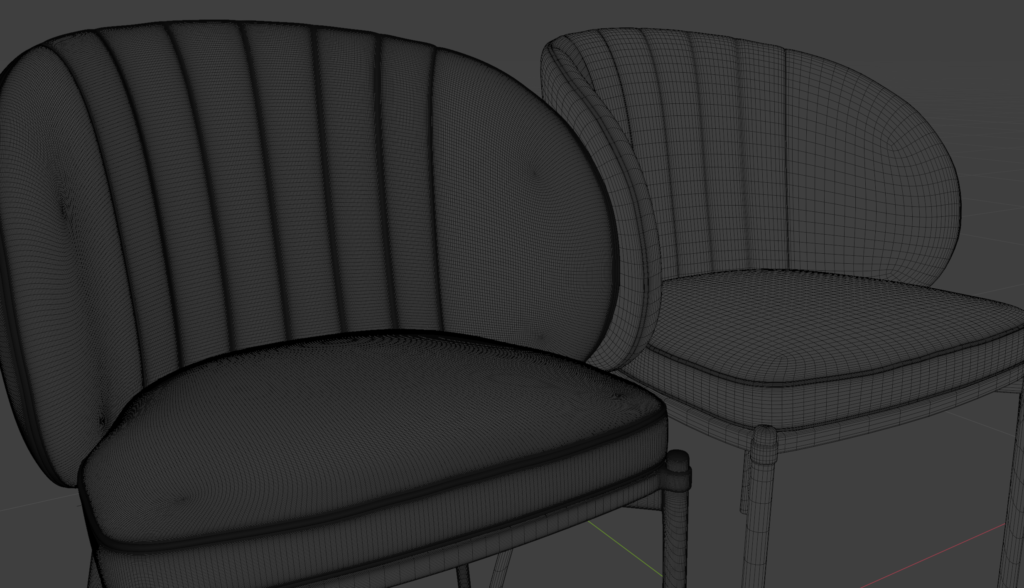
Polygons are flat surfaces that connect three or more vertices to form the mesh of a 3D model. In most cases, these are triangles or quads (four-sided shapes). Every curve, every surface detail, and every edge you see in a 3D model is made up of these tiny geometric shapes working together.
The relationship between polygon count and performance is straightforward: more polygons mean more data for your graphics card to process. When you’re rendering a scene with multiple high-polygon models, your system needs to calculate lighting, shadows, and materials for potentially millions of individual surfaces simultaneously. This is why understanding optimal polygon counts is essential for any 3D workflow.
Modern graphics hardware has become incredibly powerful, but polygon budgets still matter significantly. A single high-end workstation might handle complex architectural scenes with ease, while the same models could be unusable in real-time applications like games or AR experiences. The key is matching your polygon count to your specific use case and target hardware.
Beyond raw performance, polygon count affects file sizes, loading times, and memory usage. A furniture model with 200,000 polygons might look fantastic in a high-end visualization, but it’s completely impractical for a mobile application where the entire scene needs to stay under 50,000 polygons total.
Polygon Count Guidelines by Industry and Use Case
Different industries have evolved specific polygon count standards based on their technical requirements and delivery platforms. Understanding these guidelines helps you choose or create models that perform optimally in your intended application.
Mobile Games and AR Applications: These platforms demand extreme efficiency due to limited processing power and battery constraints. Individual objects typically range from 100-2,000 polygons, with hero assets occasionally reaching 5,000 polygons. A mobile game character might use 1,500 polygons total, while environmental props like barrels or crates stay under 500 polygons.
Console and PC Games: Modern gaming hardware allows for higher polygon budgets. Background environment objects range from 1,000-10,000 polygons, while main characters can use 15,000-50,000 polygons. Vehicles in racing games often reach 80,000-150,000 polygons, but these are typically the most detailed assets in the entire game.
Architectural Visualization: This field prioritizes visual quality over real-time performance. Furniture pieces commonly range from 10,000-50,000 polygons, while complex architectural elements like ornate columns or detailed facades can exceed 200,000 polygons. The focus is on achieving photorealistic results for still renders and walkthroughs.
Low-Poly vs High-Poly: When to Use Each Approach
The choice between low-poly and high-poly modeling isn’t just about technical limitations – it’s a creative and strategic decision that impacts every aspect of your project. Low-poly models, typically under 5,000 polygons, excel in scenarios where performance, style, or technical constraints are primary concerns.
Low-poly modeling works exceptionally well for stylized art directions, indie games, and mobile applications. These models rely on clean topology, efficient UV mapping, and skillful texturing to achieve visual appeal without geometric complexity. A well-designed low-poly character at 2,000 polygons can be more engaging than a poorly optimized high-poly version at 50,000 polygons.
High-poly models, ranging from 50,000 to several million polygons, serve different purposes entirely. They’re essential for capturing fine surface details, organic shapes, and complex mechanical parts. However, high-poly doesn’t always mean better – it means more geometrically accurate. Many professional workflows use high-poly models for detail generation through normal maps, then apply those details to optimized low-poly versions.
The hybrid approach has become standard in modern production pipelines. Artists create highly detailed sculpts for hero props and characters, then retopologize them into game-ready assets while preserving visual fidelity through texture maps. This workflow combines the best of both approaches: the detail capture of high-poly modeling with the performance efficiency of low-poly optimization.
Technical Considerations for Polygon Distribution
Smart polygon distribution is more important than total polygon count. Flat surfaces like walls or tabletops need minimal geometry – often just a few quads. Complex areas like character faces, mechanical joints, or curved surfaces require higher polygon density to maintain smooth silhouettes and proper deformation.
When working with production-ready 3D models, pay attention to how polygons are distributed across the mesh. Professional models concentrate geometry where it’s needed most while maintaining efficiency in less critical areas.
Real-World Examples: Poly Counts from Furniture to Vehicles
Understanding polygon counts becomes much clearer when you examine specific examples from different asset categories. These real-world numbers provide practical benchmarks for your own modeling decisions and help you evaluate existing models for your projects.
Office Furniture: A standard office chair designed for architectural visualization typically uses 15,000-25,000 polygons. This count allows for smooth curves in the backrest, detailed caster wheels, and proper edge definition. The same chair optimized for real-time applications would use 2,000-4,000 polygons, relying on normal maps to maintain visual quality. Conference tables range from 5,000-15,000 polygons depending on design complexity.
Kitchen Appliances: Modern kitchen models vary significantly in polygon requirements. A basic refrigerator might use 8,000-12,000 polygons for architectural renders, while a detailed espresso machine with visible mechanical components could reach 40,000-60,000 polygons. Dishwashers, ovens, and similar appliances typically fall in the 10,000-20,000 polygon range.
Automotive Assets: Vehicle modeling represents some of the highest polygon counts in production environments. A detailed car exterior for automotive marketing might use 300,000-800,000 polygons, with additional interior complexity adding another 200,000-400,000 polygons. Game-ready versions of the same vehicles typically range from 15,000-50,000 polygons total, using multiple levels of detail (LOD) for different viewing distances.
Architectural Elements: Building components show wide variation based on detail requirements. Simple window frames use 2,000-5,000 polygons, while ornate historical facades can exceed 100,000 polygons per section. Modern minimalist architecture tends toward lower polygon counts, while classical or decorative styles require significantly more geometry to capture intricate details.
Industry-Specific Optimization Strategies
Professional 3D asset creation involves sophisticated optimization techniques that go beyond simple polygon reduction. Level of Detail (LOD) systems automatically switch between different polygon count versions based on camera distance. A sofa might use 25,000 polygons up close, 8,000 polygons at medium distance, and 2,000 polygons when viewed from across a room.
Instancing allows complex scenes to reuse identical geometry efficiently. A forest scene might contain trees with 50,000 polygons each, but the same tree model repeated hundreds of times uses smart memory management to maintain performance. This technique is particularly valuable in architectural projects with repeated elements like windows, doors, or furniture pieces.
Making Smart Polygon Count Decisions for Your Projects
Successful 3D projects balance visual quality, performance requirements, and production timelines through informed polygon count decisions. Start by clearly defining your target platform, viewing distances, and performance requirements before selecting or creating models.
Consider your entire scene polygon budget, not just individual assets. A living room visualization might accommodate several 20,000-polygon furniture pieces, but the same models would overwhelm a mobile AR application. Plan your polygon distribution across all scene elements, reserving higher counts for hero objects that viewers will examine closely.
Modern production workflows benefit from having multiple polygon count versions of key assets. Create or source high-quality base models, then optimize them for specific use cases. This approach provides flexibility across different project requirements while maintaining consistent visual standards.
Whether you’re working on architectural visualization, game development, or product design, having access to professionally optimized models saves significant time and ensures consistent quality. CGAxis All-Access subscription provides unlimited downloads of production-ready 3D models with optimized polygon counts for various applications, helping you focus on creativity rather than technical optimization.